ACCOUNTING + BUSINESS INTELLIGENCE

Know what the company earned. Know why.

Clean Can Copilot is being built so the same system that runs customers, routes, drivers and billing can also become the financial and analytical brain of a trash can cleaning company.

ACCOUNTING WITHOUT REBUILDING THE BUSINESS

The revenue already has a story attached to it.

When revenue flows through Clean Can Copilot, the platform already knows the customer, service, date and service details behind that money. Capture expenses and other required financial activity in the same system, and the accounting side can use the work and transactions already recorded instead of asking the owner to recreate them later.

REVENUE

Income connected to service

Invoices, payments, credits, recurring plans and rules that record revenue in the right place stay tied to the customer and work that produced them.

EXPENSES

Capture what the business spends

Record expenses and receipts, categorize costs and keep the details needed to understand where money is going.

BOOKS

Complete accounting records

Track money customers owe you, bills you owe, your main accounting ledger, bank/card matching and corrections with a complete history of what changed.

REPORTING

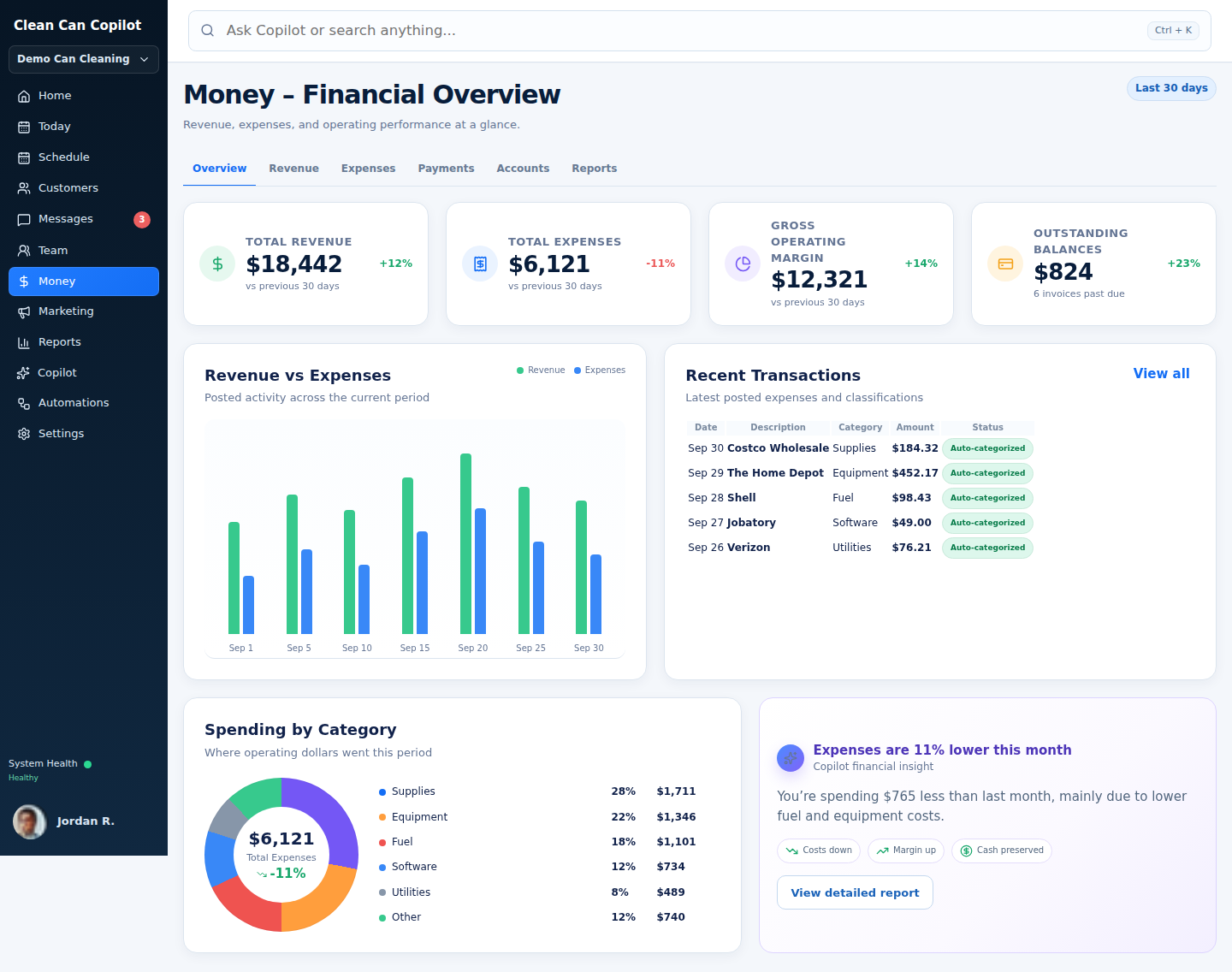
Profit & Loss (P&L) and financial trends

View Profit & Loss, revenue and expense trends, margins and period comparisons from the same business data.
Important:Financial reporting can only be as complete as the financial activity captured in the system. The launch accounting model is being designed around complete company books with a clear history of changes rather than pretending missing expenses do not exist.
FINANCIAL VIEW

From “How much did we make?” to “Where did the margin go?”

  • Profit & Loss by month, quarter, year or custom period
  • Revenue and expense trend graphs
  • Expense categories and spending by vendor
  • Gross and operating margin analysis where the recorded data supports it
  • Money customers still owe you (accounts receivable) and outstanding balances
  • Match recorded transactions to bank and card activity
  • Revenue by service plan, route, customer group or other useful ways of grouping the business
  • Financial corrections with a full history of changes
Clean Can Copilot accounting workspace
STRIPE + SQUARE

Use the payment processor your cleaning company already trusts.

Clean Can Copilot will support both Stripe and Square. Stripe or Square keeps the secure card and bank details while Copilot owns the customer relationship, billing rules, billing records and secure Stripe/Square references needed to charge the right customer.

Companies can connect an existing Stripe or Square payment account. If saved customer payment methods already exist in that connected Stripe or Square account and can be used for future payments, Copilot can link to those saved payment records instead of asking every customer to enter their card again.

STRIPEConnect an existing Stripe account

Reuse the payment account relationship and link to existing saved Stripe customer and payment records when available.

SQUAREConnect an existing Square seller account

Reuse the seller account relationship and link to existing saved Square customer and card records when available.

CARDSVisa, Mastercard, American Express, Discover and other supported card networks
WALLETSApple Pay, Google Pay, Cash App Pay and Link where supported
BANKACH / bank payments where supported by the connected processor and billing flow
FLEXIBLE PAYEligible options such as Affirm, Klarna, Afterpay/Clearpay or Amazon Pay where supported
Recurring billing note:Not every checkout method is eligible for automatic recurring charges. Clean Can Copilot will only offer recurring auto-pay with payment methods and permissions supported by the connected Stripe or Square account for that use.
DEEP BUSINESS STATS

The owner should not have to know which report contains the answer.

If the data is recorded, the owner should be able to break it down almost any way that matters to a can-cleaning operation, even if nobody thought to build that exact report ahead of time.

STOP PERFORMANCE

How long does the work really take?

  • Average stop time
  • Stop time by driver
  • Stop time by can count
  • First-time vs recurring
  • Service-plan comparisons
  • Exception impact on stop duration
ROUTE PERFORMANCE

Where does the day go?

  • Stops per route hour
  • Drive time vs cleaning time
  • Average time between stops
  • Density trend over time
  • Projected vs actual route duration
  • Route performance by day/driver
CUSTOMER PERFORMANCE

Which customers create value?

  • Average customer value
  • Revenue by plan/customer group
  • Retention and cancellation patterns
  • Add-on and additional-can behavior
  • First-service conversion timing
  • Customer profitability where costs are captured
DRIVER PERFORMANCE

How is each crew actually performing?

  • Average stop time by driver
  • Stops per hour trend
  • Completion rate and service-problem rate
  • Service time compared fairly by number of cans
  • Route finish-time performance
  • Comparable groups of similar work
ASK COPILOTExamples that should feel ordinary, not exotic.
“What is our average stop time for first-time customers with more than two cans?”
“Break that out by driver for the last 90 days.”
“Which monthly routes improved density the most this quarter?”
“Show revenue per service hour by plan.”
“Does adding a third can increase stop time enough that our pricing should change?”
“Compare stops per hour on routes with fewer than 15 miles of driving versus routes above 30 miles.”
“What percentage of service problems come from inaccessible cans?”
“Which customer groups have the highest lifetime revenue?”
ONE CONNECTED BUSINESS RECORD

This is why the operating system matters.

A standalone accounting package knows the transaction. A route package knows the stops. A CRM knows the customer. Clean Can Copilot is being built so those truths can stay in the right part of the system while still being analyzed together.

That creates a level of can-cleaning-specific reporting that generic software cannot easily reproduce without exports, spreadsheets and manual matching and double-checking.

FOR OWNERS WHO LOVE THE NUMBERS

Stop asking “what reports do you have?” Start asking the question you actually want answered.

Join the launch list