THE COMPLETE PLATFORM

Everything it does. One system.

Public access remains closed while we finish and verify the launch system. This is the operating platform we are building for release, organized the way a trash can cleaning business actually runs.
CUSTOMERS & SERVICE

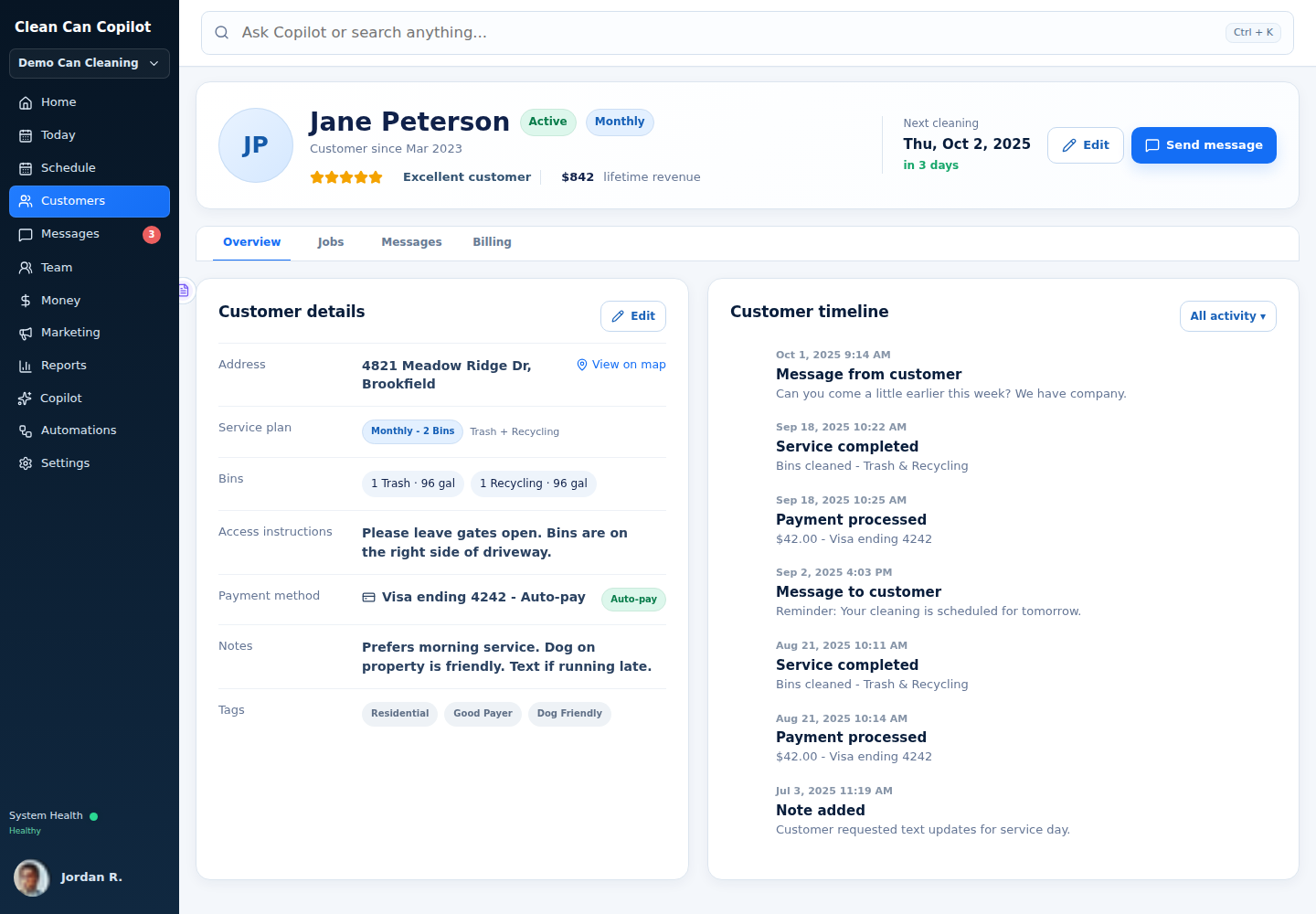
Know the customer, the property and what you promised.

  • Customer profiles, status and history
  • Multiple service locations with one trusted address for each location
  • Phone/email contacts, internal notes and customer history
  • Customer tags, equipment/details and useful service information
  • Service types, plans and quantities
  • Price books and what each plan includes and costs
  • Complete service history connected to what happened in the field
  • Fast customer lookup for office staff and Copilot
Clean Can Copilot customer workspace
SCHEDULING & AVAILABILITY

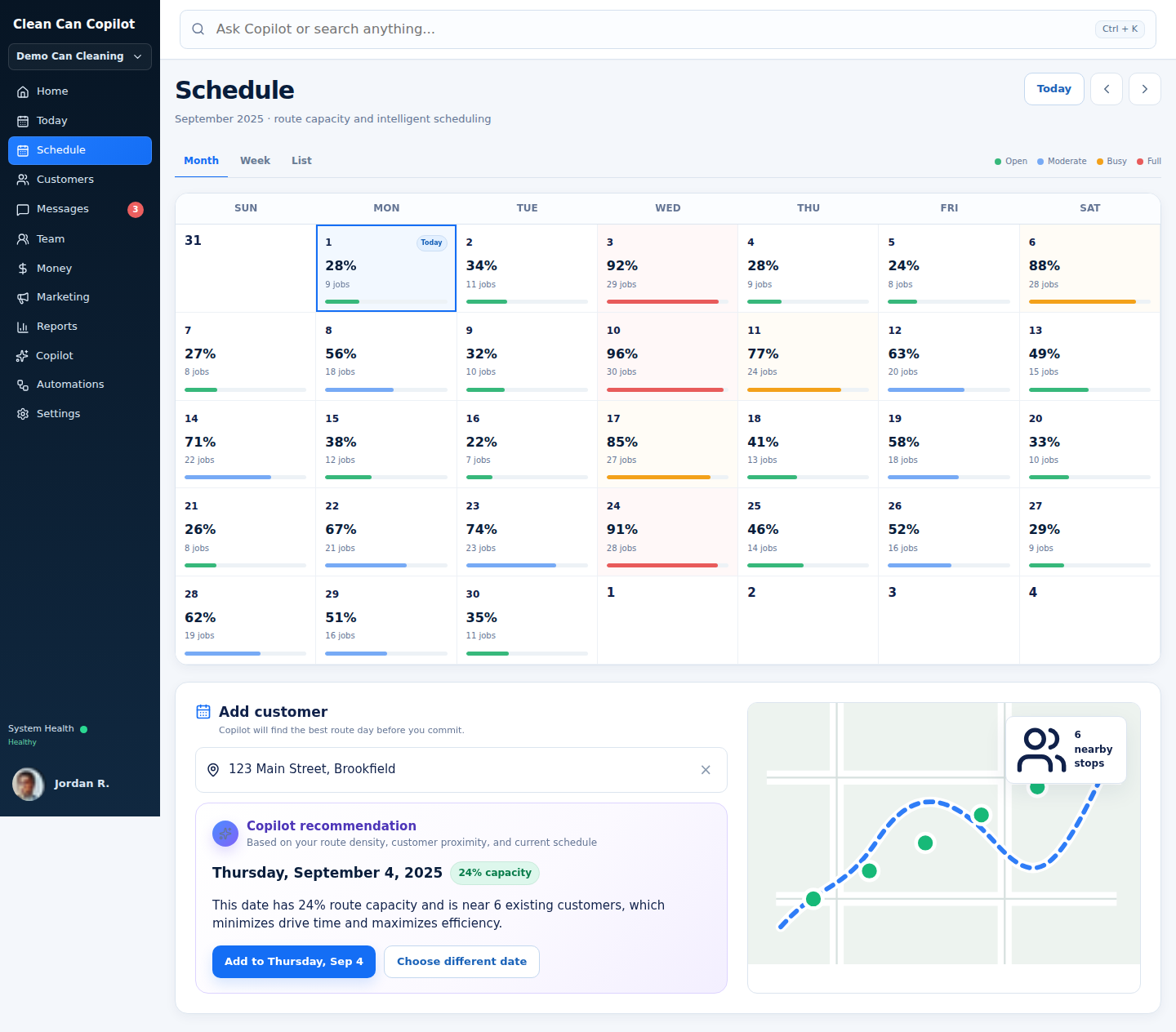
Recurring service without calendar spaghetti.

  • Recurring service rules and automatic future service dates
  • Turn recurring plans into actual scheduled visits and service windows
  • Dates when a customer says service is unavailable
  • City and trash-hauler holiday calendars
  • Company holidays and automatic scheduling-conflict checks
  • Check that a date is actually available before scheduling work
  • Scheduling problems are shown instead of silently moving dates
  • Tools to compare imported schedules with the old system and catch mismatches
Clean Can Copilot schedule workspace
SERVICE AREAS & DENSITY

Define where you serve without confusing it with how you route.

  • Draw your service area directly on a map
  • Or define service areas by ZIP code, city or radius
  • Or limit service by drive time from your home base
  • Or allow service anywhere when no boundary is needed
  • Clear records showing whether an address is inside the service area
  • If whether an address can be serviced is uncertain, signup stops for review instead of guessing
  • Service-area rules stay separate from route-density planning
  • Nearest practical first-clean scheduling instead of forcing customers to wait for a zone day
  • Move the next recurring visit onto the best nearby route day
  • Customer communication when the recurring service date is optimized
  • Support for special cases and combined service-area rules
SERVICE BOUNDARY
Where can we sell service?

One question.


ROUTE DENSITYHow should today’s work fit together?

A separate question.

TRUE ROUTE DENSITY

Density should improve after the sale, not block the sale.

Zone-only booking can create a bad tradeoff: make the customer wait for the day that fits your route, or accept the customer quickly and live with a scattered recurring schedule. Clean Can Copilot is being designed to separate the first-clean promise from the long-term recurring pattern.

NEW CUSTOMERWants service now

Book the nearest practical first cleaning.

→
COPILOTFinds the best recurring route group

Evaluate nearby recurring work, route day, service frequency and scheduling rules.

→
NEXT SERVICEMove into the dense route

Align the next recurring cleaning and communicate the new recurring day to the customer.
First cleanOptimize for customer speed
Recurring cleansOptimize for route density
Customer communicationConnect the two without surprises
ROUTES & DISPATCH

Turn scheduled work into a day the crew can actually execute.

  • Daily Dispatch Board
  • Which stops are on each route and in what order
  • True Route Density that improves recurring patterns over time
  • The first cleaning can happen fast while future visits move to the best long-term route day
  • Optimize and reorder routes safely
  • Assign and reassign drivers
  • See current progress and service problems
  • Customer, location, plan and route information come together without creating conflicting copies
  • ETAs, workload balancing and smarter dispatch tools planned for launch
Clean Can Copilot route optimizer
DRIVER & FIELD OPERATIONS

The right stop, the right details, the right access.

  • Securely paired driver devices that only show the work assigned to that driver
  • Drivers only see the stops currently assigned to them
  • En route, arrival and proof of completion
  • Notes and service problems
  • Open navigation using the latest assigned address
  • Offline actions safely retry when signal returns without creating duplicate updates
  • If a stop is reassigned, the previous driver immediately loses access to it
  • Photos, proof of service and additional field tools being completed for launch
CURRENT STOP1428 Sample RidgeAssigned • ready
EN ROUTEARRIVEDCOMPLETE
STOP DETAILS

Gate code, customer notes, number of cans, navigation and service problems stay with the stop.
TWO-WAY CUSTOMER TEXTING

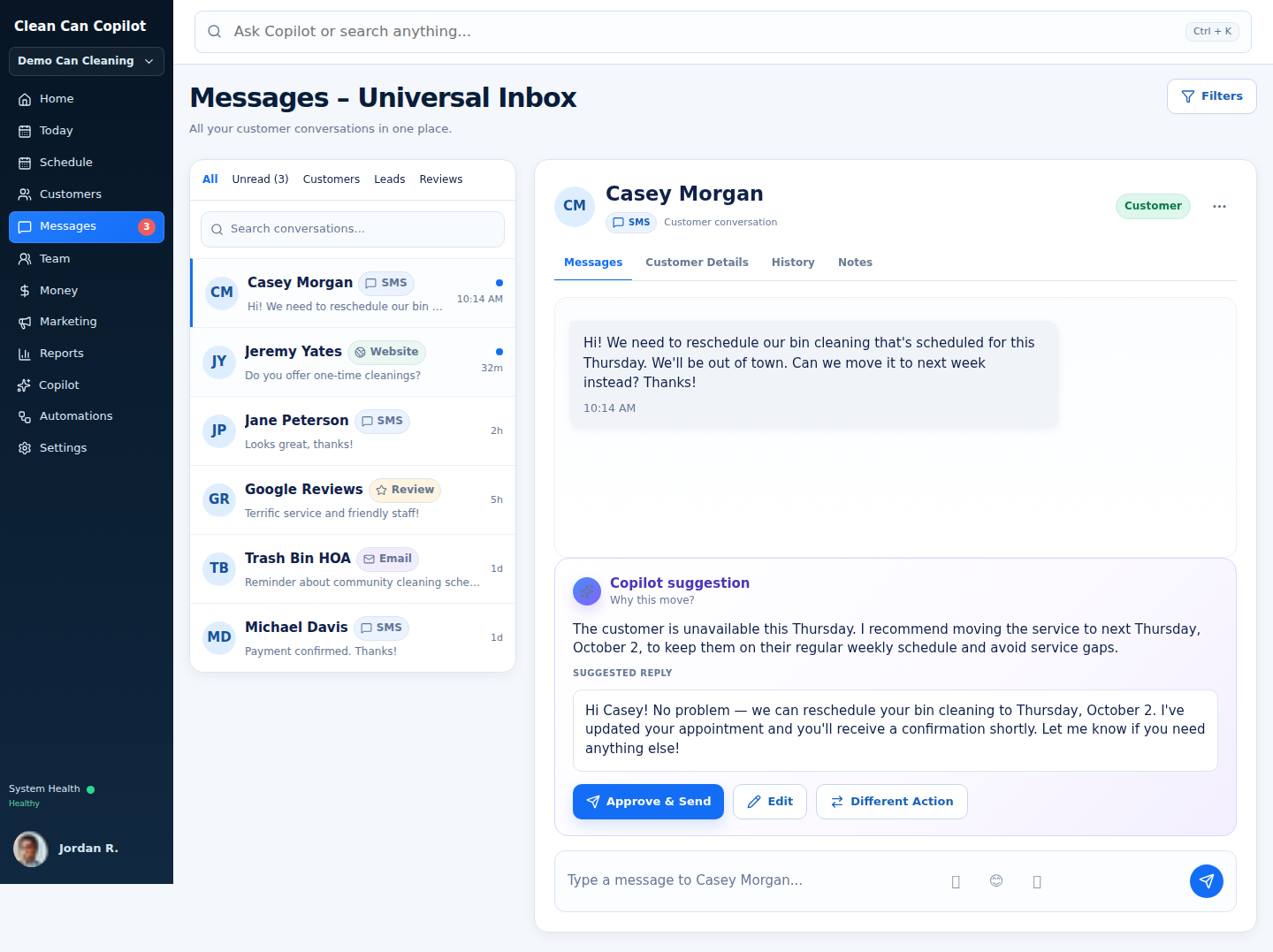
Have a real text conversation without losing the customer history.

  • Send and receive SMS directly with customers
  • Reply from an authorized phone or the Clean Can Copilot web dashboard
  • One shared customer conversation instead of separate personal-phone threads
  • Inbound customer conversations matched to the customer record
  • Customer service and scheduling history are shown before responding
  • Copilot-prepared replies for review and editing
  • Reschedule assistance tied to the service rules
  • Day-before, next-on-route and completion notifications
  • Email Copilot helps sort the office inbox and prepare replies or next steps
  • Teach Copilot which low-value or spam emails to ignore
  • The team can see the conversations they need, while only allowed people can send or change things
Clean Can Copilot message center
MARKETING COPILOT

Connect the ad spend to the customers and revenue it actually creates.

Clean Can Copilot is being built to help trash can cleaning companies manage Google Ads and Facebook/Instagram Ads from the same system that already knows the customer, service plan and revenue.

GOOGLE ADS

Know what happens after the click.

Track spend, leads, booked customers, cost per new customer and the revenue that came from those customers.

FACEBOOK + INSTAGRAM

Bring Facebook and Instagram campaigns into the same picture.

Connect Facebook and Instagram advertising so owners can compare results across channels instead of reading separate dashboards.

COPILOT

Get help running the campaigns.

Copilot can watch performance, explain changes, prepare ad or targeting improvements and help the owner decide what to adjust next.

BUSINESS RESULTS

Optimize for customers, not vanity metrics.

Because the system knows who actually booked and paid, marketing can be judged by customer acquisition cost, recurring revenue and customer value, not clicks alone.
“Which campaigns brought us the most new recurring customers?”
“What did we spend per booked customer this month?”
“Which service areas are producing our best customers?”
“What should we change in our ads this week?”
Spend stays under owner control.Copilot can prepare and recommend campaign changes. Significant budget/spend changes and major campaign launches stay reviewable before they go live.
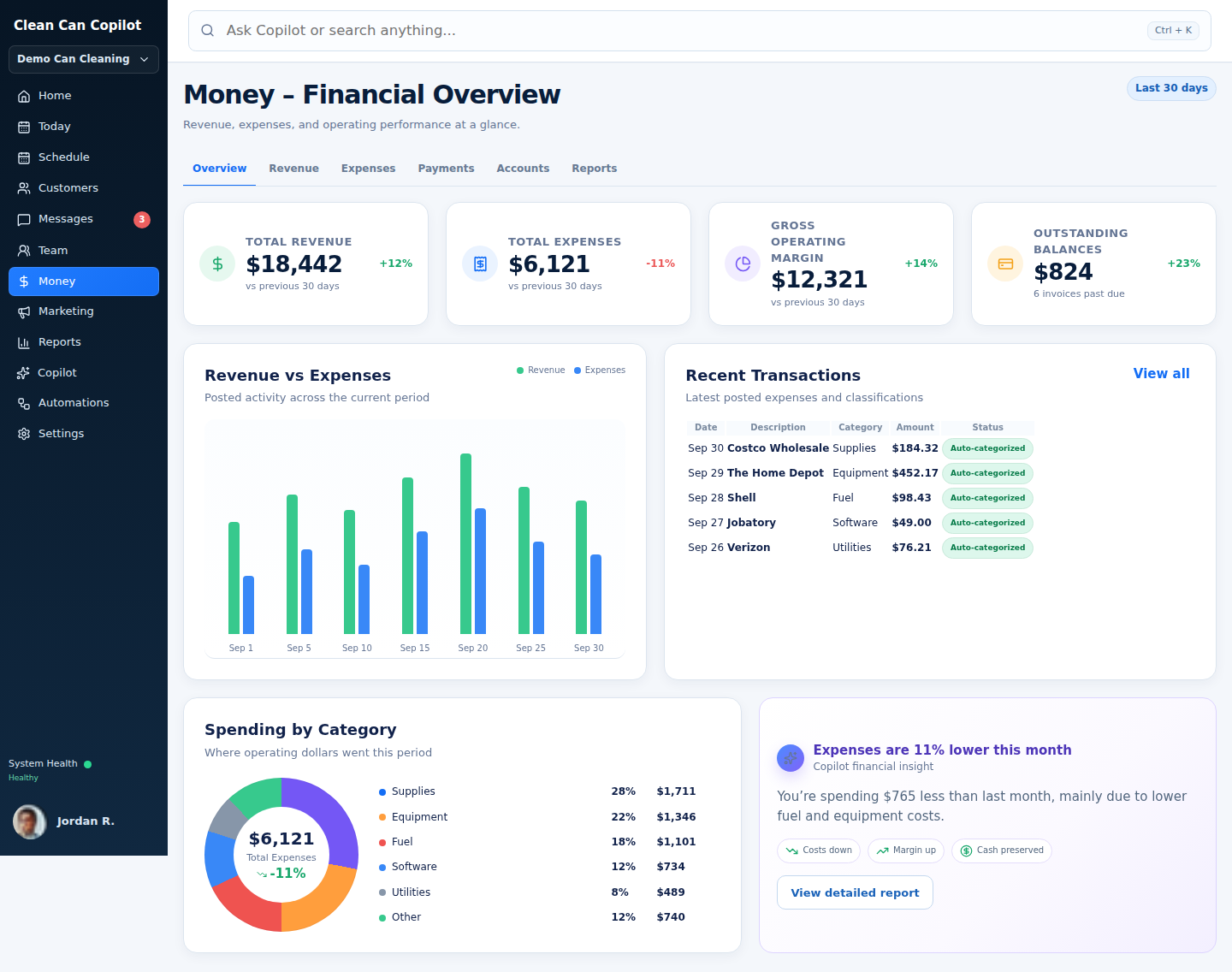
ACCOUNTING & MONEY

The books should know where the money came from.

  • Revenue tied directly to customers, services and service records
  • Billing accounts, invoices, credits and balances
  • Recurring billing that follows each customer’s service plan
  • Stripe and Square connections
  • Connect your existing Stripe or Square account instead of forcing you to switch payment companies
  • Customer payment options can include major cards, digital wallets, ACH/bank payments and flexible-pay methods when Stripe or Square supports them for that business
  • Checkout only shows payment options that are actually available for that business and that type of payment
  • Expense and receipt capture with easy categories
  • Track money customers owe you and bills you owe
  • Main accounting ledger (general ledger) plus simple rules for recording revenue in the right place
  • Match recorded transactions to bank and card activity
  • Profit & Loss statements by month, quarter, year or custom period
  • Revenue, expense, margin and trend graphs
  • Corrections keep a full history instead of silently changing old records
See the accounting vision →
Clean Can Copilot accounting and money workspace
STATISTICS & BUSINESS INTELLIGENCE

If the system recorded it, the owner should be able to ask questions about it.

Stop time is only the beginning. Because customer, schedule, route, driver, completed-service and financial data can be connected, Clean Can Copilot can calculate highly specific business questions instead of limiting owners to prebuilt reports.

TIMEAverage stop time

Overall, by driver, by route, by service type, by can count, by first-time vs recurring customer.

ROUTESRoute efficiency

Stops per hour, drive time vs service time, density trends, route completion behavior and recurring-cluster performance.

CUSTOMERSCustomer value

Average customer value, revenue by customer group, retention, plan mix, add-on behavior and performance by service frequency.

MONEYProfitability

Revenue and margin by plan, route, service type, truck, customer segment or whatever useful combinations the recorded data supports.

ASK COPILOT“Compare average stop time for first-time customers with 1–2 cans versus first-time customers with 3+ cans, broken out by driver.”

A question this specific should not require exporting three spreadsheets and building a pivot table.
TEAM, DEVICES & SECURITY

Add people without handing everyone the keys to the building.

  • Staff profiles for each team member
  • Roles and permissions that are kept separate for each company
  • Admins and dispatchers control who gets each job
  • Securely connect or remove driver devices
  • Drivers can only act on work currently assigned to them
  • Important actions are logged so you can see what changed and when
  • One company can never see or change another company’s data
  • Built to securely keep each company’s data separate
ADMINAssign • correct • controlOFFICECustomers • messages • moneyDRIVERAssigned field work onlyCOPILOTHelp using only the information you allow Copilot to use
AUTOMATIONS & BUSINESS HEALTH

Routine work should happen. Exceptions should find you.

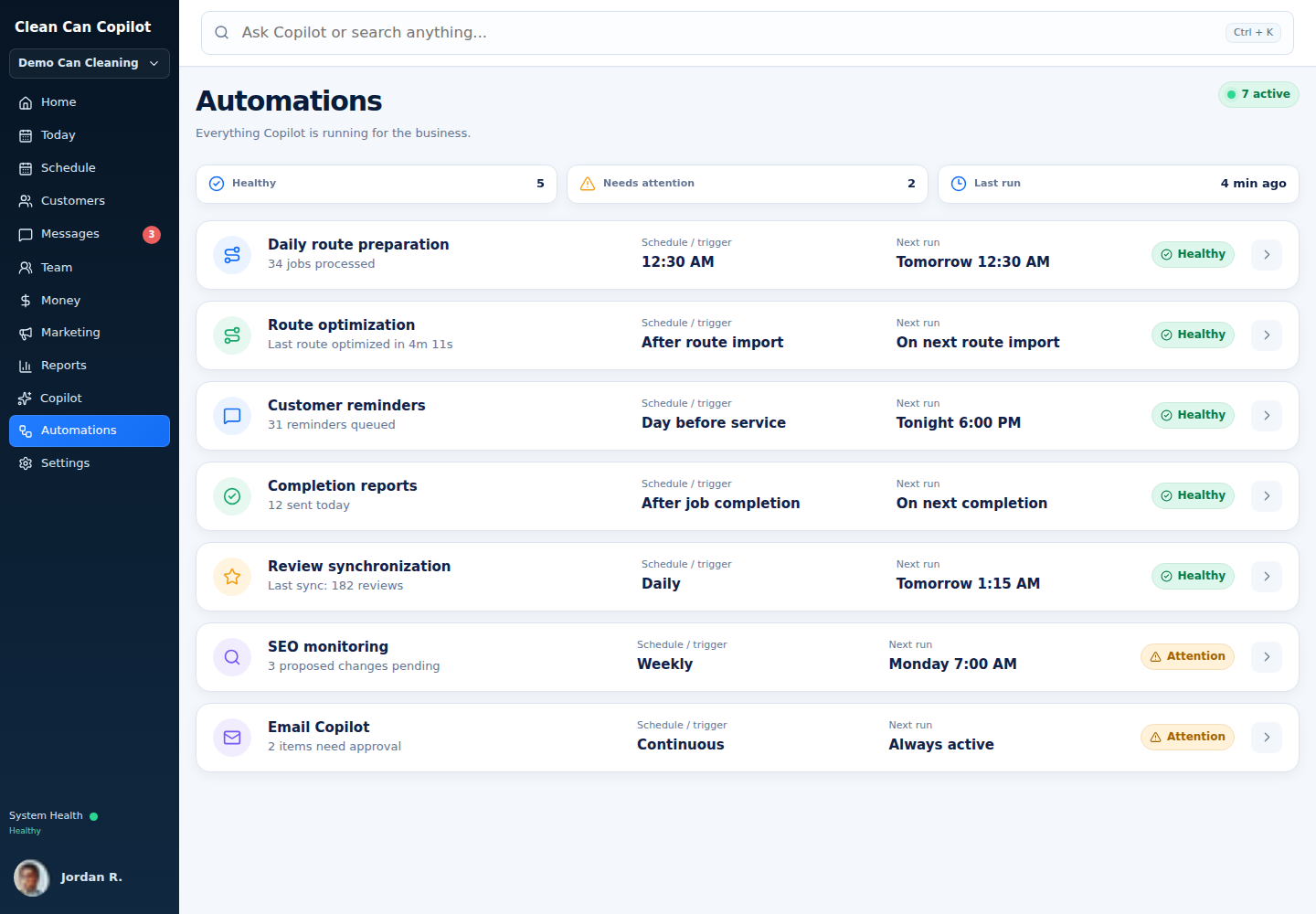
  • Automations triggered by real events in the business
  • Scheduled route preparation and daily work setup
  • Automated customer notifications
  • Office to-do lists and problems that need attention
  • Dashboards showing business health and workload
  • Revenue and operations reports
  • Important actions wait for approval before they happen
  • A clear history shows what each automation did and changed
Clean Can Copilot automations workspace
LAUNCH-SCOPE CHECKLIST

The table stakes are not optional.

Operators evaluating software in this industry already expect much more than a customer list and a route map. These are the practical features Clean Can Copilot is being designed to bring into one connected operating system. Final release details may evolve while development is completed.

Customer acquisition

  • Website/customer signup flow
  • Check during signup that the address is inside the service area
  • Plans you can show publicly or offer only to certain customers
  • Plans and prices that can change by service area
  • Coupons and promotional offers
  • Follow up when someone starts signup but does not finish
  • Save leads outside your current service area for future expansion
  • Marketing tracking connections

Customer self-service

  • Secure customer portal
  • Profile and contact updates
  • Plan/subscription management
  • Payment-method management
  • Service and payment history
  • Customer unavailable dates
  • Additional/one-time cleaning requests
  • Notification preferences
  • Referral links and credits

Office operations

  • Customer, location and service records
  • Worker and role management
  • Truck and vehicle records
  • Trash-hauler records
  • Trash-hauler and company holiday calendars
  • Seasonal service pauses
  • Notification control center
  • Send review requests to the right customers and follow up
  • Follow-up campaigns for past one-time customers

Scheduling & dispatch

  • Recurring scheduling
  • Customer/admin scheduling controls
  • Dates when a customer says service is unavailable
  • Fast first-clean scheduling with next-recurring-date density alignment
  • Customer communication around recurring-date optimization
  • Route grouping and optimization
  • Manual route adjustment
  • Multi-driver assignment
  • See daily route and stop progress
  • Map and list views
  • Route progress and service problems

Field execution

  • Securely connected driver devices that can be removed at any time
  • Drivers only see their assigned work
  • En Route and Arrived buttons
  • Proof of completion
  • Before/after photo handling
  • Report missing cans and other service problems
  • Open navigation with the latest assigned address
  • Offline actions safely sync when signal returns
  • Driver progress/time visibility

Billing & retention

  • Recurring billing rules
  • Take payments during customer signup
  • Invoices, credits and corrections
  • Failed-payment follow-up
  • Handle expired cards or payment methods
  • Customer payment self-service
  • Connect an existing Stripe or Square account
  • Major cards, digital wallets, ACH/bank payments and other payment methods available through Stripe or Square
  • Referral-credit tracking
  • See revenue and outstanding balances
  • Expense and receipt capture
  • Profit & Loss (P&L) by month, quarter, year or custom period
  • Match recorded transactions to bank and card activity
  • Revenue, expense and margin trend analysis

Customer texting & communications

  • Two-way SMS conversations with customers
  • Reply from authorized phones or the web dashboard
  • Shared conversation history tied to the customer
  • Day-before reminders
  • Next-on-route / en-route notifications
  • Completion notifications
  • Customer message workspace
  • Replies prepared using the customer’s service history
  • Reschedule assistance
  • Sort and prioritize office email and prepare next steps
  • Teach Copilot which low-value or spam messages to ignore
  • Keep each customer’s message history together

Marketing & customer acquisition

  • Google Ads connection and performance tracking
  • Facebook/Instagram Ads connection and performance tracking
  • Spend, leads and booked-customer reporting
  • Cost per booked customer
  • Revenue and customer value by lead source
  • Copilot help reviewing and managing campaigns
  • Owner review for significant spend changes
  • Marketing results connected to the customer record

Growth & control

  • Service-area and boundary management
  • True Route Density stays separate from the question of whether you serve an address
  • Recurring routes get denser as the customer base grows
  • Secure separation between companies
  • Role-based permissions
  • Important business actions are logged
  • Tools to move customer data in or out
  • Business health dashboards and statistics
  • Ask detailed questions across routes, drivers, customers, timing and financial data
  • Ask Copilot questions using only the business data you are allowed to see
  • Automations with approval steps for important actions
  • Copilot help using the company information you are allowed to access
YOUR COPILOT

Ask for help in the language you already use.

Copilot is being designed to work from the same customer, route, schedule and business information as the rest of the system, so the help is connected to the actual customer, route, schedule, money and what happened in the field.

What needs my attention today?
Help me answer this customer.
Why is this route running late?
Who was affected by the holiday?
Show me unresolved service problems.
Prepare tomorrow’s route review.
Which customers need a follow-up?
What changed since this morning?
Summarize today’s completed work.
Show me billing items that need attention.
Help me reschedule this customer.
What should I handle before I leave?
SEE ENOUGH?

Join the launch list. We’ll open access when the entire system is ready.

Join launch list